 Kurdal Apps

Voxt
Productivity
Video to text on your phone
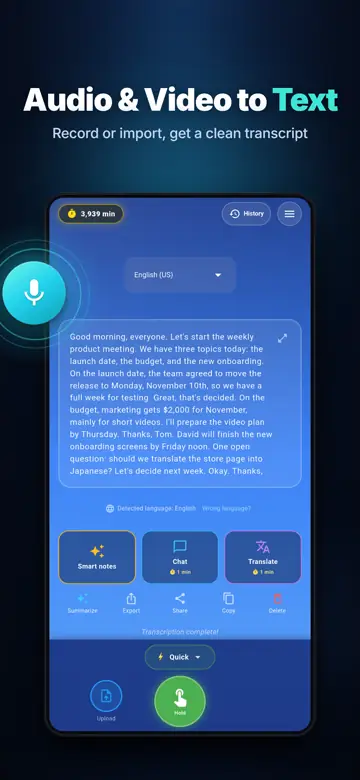
To turn a video on your phone into text, open Voxt, tap Upload and pick the video. Voxt takes the audio track out of the video on your phone, shows how many minutes it will use and, after you confirm, writes the transcript in the spoken language, which it detects by itself. Then you can summarize it, make notes, translate it, ask questions about it or export it. If the video is on YouTube and has captions, you can paste the link instead. Voxt runs on iPhone and Android and includes free minutes.
- iPhone and Android
- MP4, MOV, MKV and more
- YouTube links with captions
- Free minutes every month
Free to download. Pro is optional and adds more minutes plus PDF, Word and SRT export; prices are shown in the store.
How to transcribe a video on your phone
Pick the video
Tap Upload. On iPhone, choose Photos to pick a video from your library, or browse the Files app, including iCloud Drive and Google Drive. On Android, the system file picker opens your phone storage, Downloads or Drive.
Confirm the minutes
Voxt separates the audio track on your phone, so it uploads a few megabytes instead of the whole video. It then shows how many minutes the video will use and waits for you to confirm. The first time, it also asks your permission to share data with its AI services.
Get the transcript
Voxt detects the spoken language and writes the text. If it picked the wrong language, choose the right one and transcribe again. Then make a summary, smart notes or a translation, chat with the transcript or export it.
Transcribe a YouTube video from a link
If the video is on YouTube, you don't need the file. Copy the link and paste it into Voxt; it also suggests a YouTube link it finds on your clipboard. Voxt reads the video's captions and gives you the transcript, a summary and a chat about the video.
- YouTube only (youtube.com and youtu.be links). Instagram, TikTok and other video links are not supported.
- The video must have captions; automatic captions work too. Without captions you see an error and no minutes are used.
- Each YouTube video uses 3 minutes of your balance, and it works on the free plan too.
What Voxt can do with a video
Video and audio formats
Video: MP4, MOV, M4V, 3GP, MKV, WEBM, AVI, FLV and WMV. Audio: MP3, M4A, AAC, WAV, FLAC, OGG, OPUS, WMA and AIFF.
Long videos
Long files are supported: the server splits them into 20-minute parts. How much you can transcribe depends on your minute balance; one minute of audio uses one minute, rounded up.
Smaller uploads
Only the audio track is uploaded. It is separated on your phone, so a large video becomes a few megabytes. If that fails, the video is uploaded as it is.
Language detection
Voxt detects the spoken language. If it is wrong, pick one of 30 languages and transcribe again; it costs the same as the first time.
Summaries, notes and chat
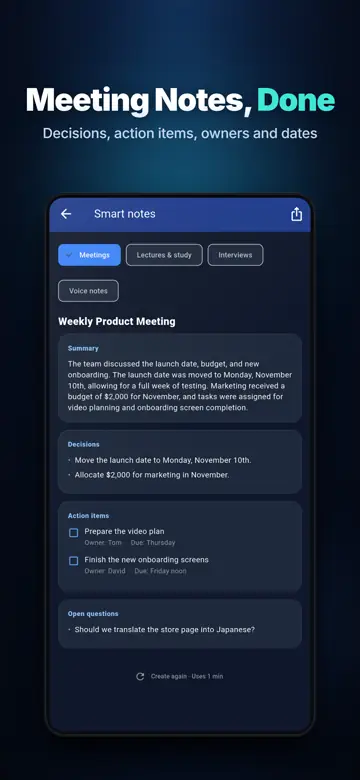
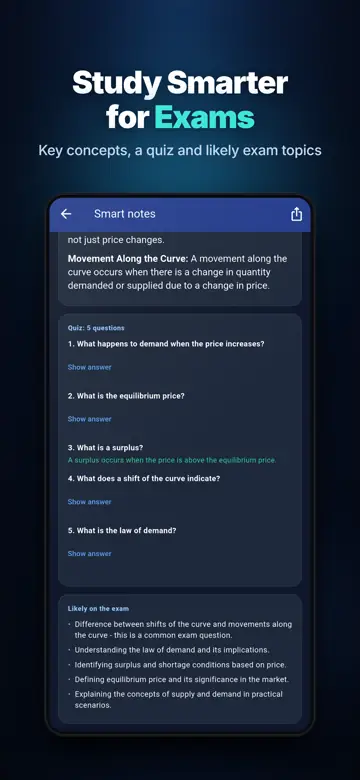
Summary, bullet points and smart notes for meetings (decisions, tasks with an owner and date, open questions), lectures (key concepts and a 5-question quiz), interviews and voice notes. Chat with the transcript or translate it. Each AI action uses 1 minute.
Export and subtitles
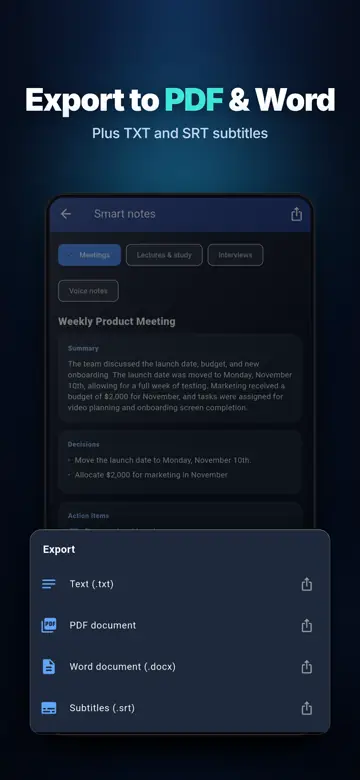
Copy or share the text, or export it as TXT on the free plan. Pro adds PDF, Word (.docx) and SRT subtitle files with timestamps.
Screenshots
Limits to know before you start
Voxt is a phone app for turning recordings and files into text. Here is what the free plan and Pro include, and what Voxt does not do.
Free and Pro
- New users start with 30 free minutes. On the 1st of each month the free balance is topped up to 20 minutes.
- On the free plan a recording made in the app stops at 10 minutes. Imported video and audio files don't have this cap.
- Pro gives 200 minutes a week or 4,000 minutes a year, removes the 10-minute recording cap and adds PDF, Word and SRT export.
- Each AI action (summary, notes, translation, chat message) uses 1 minute; a YouTube video uses 3.
What it doesn't do
- No speaker labels: the transcript does not say who is speaking.
- No timestamps on screen: the transcript is plain paragraphs. Timestamps come only with the SRT export in Pro.
- No “Share to Voxt” from other apps: you open Voxt and pick the file with Upload, one file at a time.
- No subtitles burned into the video: you get an SRT file.
- No Instagram, TikTok, Vimeo or Zoom links: download the video and import the file instead.
- No offline transcription: cloud transcription needs an internet connection.
- No web or desktop app: Voxt runs on iOS and Android.
Privacy: where your video goes
Voxt transcribes in the cloud. From a video, only the audio track is uploaded; the original file is sent only if the audio can't be separated on your phone.
- Processing runs on Amazon Web Services in the US (N. Virginia). OpenAI Whisper writes the transcript; OpenAI text models and Amazon Translate handle summaries, chat and translation. For YouTube links, Apify reads the captions.
- Voxt asks for your permission before the first cloud processing. You can take it back in Settings.
- Uploaded audio and video files, and their parts, are deleted automatically after 90 days. Transcripts, summaries and chats stay in your history until you delete them.
- Your content is not used to train AI models: under OpenAI's API policy, API inputs are not used for training by default.
- No account: Voxt works with an anonymous ID.
Details are in the Voxt privacy policy.
Frequently asked questions
How do I transcribe a video on my phone?
Install Voxt, tap Upload and choose the video: on iPhone from Photos or the Files app, on Android from the system file picker. Voxt separates the audio, shows how many minutes it will use and writes the transcript after you confirm.
Which video formats does Voxt support?
MP4, MOV, M4V, 3GP, MKV, WEBM, AVI, FLV and WMV. Audio files such as MP3, M4A, WAV and OPUS work too.
Is there a length limit for videos?
Long videos are supported: the server splits them into 20-minute parts. How much you can transcribe depends on your minute balance, because one minute of audio uses one minute, rounded up. The free plan's 10-minute cap applies only to recordings made in the app.
Can Voxt transcribe a YouTube video from a link?
Yes, if the video has captions; automatic captions work too. Paste the YouTube link and Voxt gives you the transcript, a summary and a chat about the video. It uses 3 minutes of your balance and works on the free plan. A video without captions shows an error and uses no minutes. Links from other sites are not supported.
Does the transcript show timestamps or who is speaking?
No. On screen the transcript is plain paragraphs without speaker labels or timestamps. If you need timestamps, Pro can export the transcript as an SRT subtitle file.
Can I share a video to Voxt from another app?
No, Voxt does not appear in other apps' share menus. Save the video on your phone or in a cloud drive, then open Voxt and pick it with Upload.
Is Voxt free?
Voxt is free to download. New users get 30 free minutes, and the free balance is topped up to 20 minutes on the 1st of each month. Pro adds more minutes and PDF, Word and SRT export; prices are shown in the store.
Get Voxt
Voxt is free to download on iPhone and Android.
Free to download. Pro is optional and adds more minutes plus PDF, Word and SRT export; prices are shown in the store.
More about Voxt: Voxt app overview · Voxt vs Otter.ai comparison