
Reelow
Photo and video
Faceless YouTube Shorts maker: turn a topic into a narrated Short on your phone
Reelow is a phone app for iPhone and Android that makes faceless vertical videos. You type a topic, pick YouTube and a voice, and about two minutes later you get a 9:16 video with a script, an AI voiceover, stock footage and word-by-word captions. There is no camera, no microphone and no editing timeline involved. You then upload the video to YouTube as a Short yourself.
- iPhone and Android
- No camera or microphone
- 7 video languages
- No sign-up
Optional Pro subscription; prices are shown in the store.
What you get
A script written for Shorts
A hook in the first line, short sentences and a clear ending. With YouTube selected, the script is told as a story built to keep viewers watching.
An AI voiceover
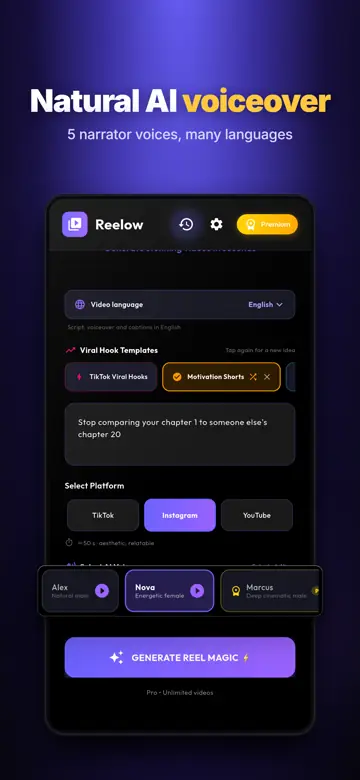
Five narrator voices: Alex and Nova for everyone, plus Marcus, Sophia and Liam with Reelow Pro.
Stock footage for every sentence
Reelow searches a short clip from Pexels for each line of the script and cuts them together.
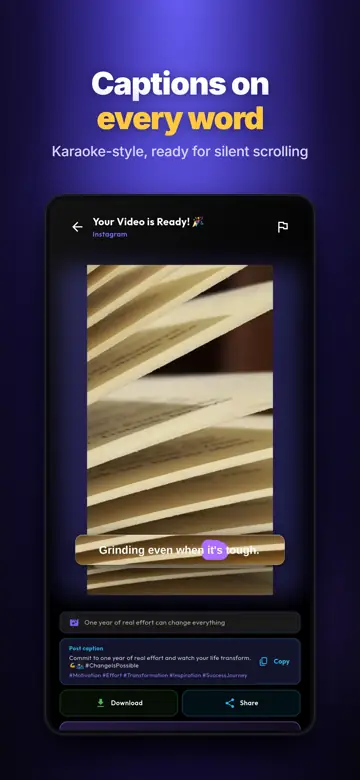
Word-by-word captions
Karaoke-style captions are burned into the video, so it works with the sound off.
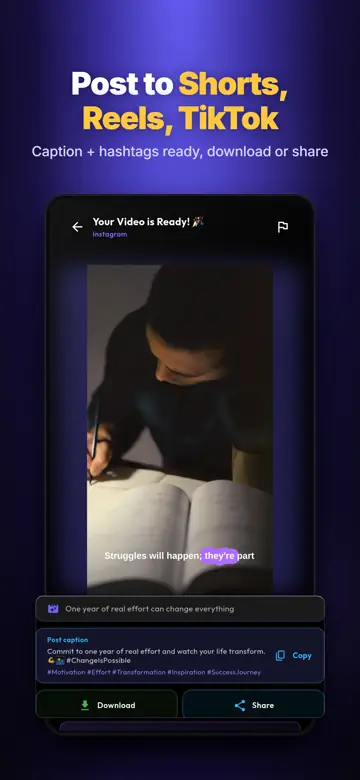
A post caption with hashtags
A ready caption you can copy into your YouTube title and description.
Seven video languages
English, Spanish, Portuguese, German, French, Italian or Turkish. Your phone’s language is selected by default.
Step by step: make a faceless YouTube Short with Reelow
Open Reelow
Install Reelow from the App Store or Google Play and open it. There is no sign-up and no account to create.
Check the video language
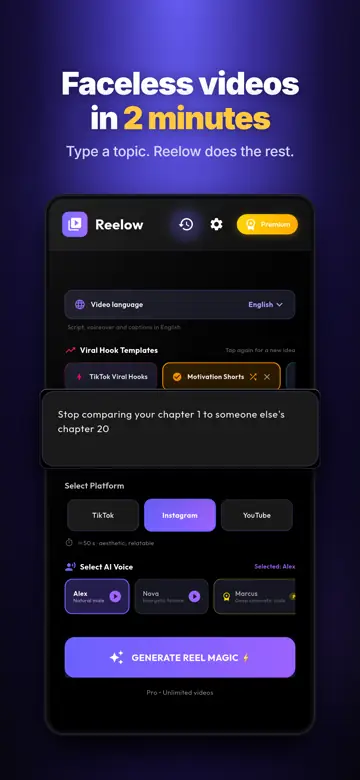
On the Home screen, the Video language row shows the language your script, voiceover and captions will be written in. Tap it to choose another one (Choose video language). The app itself is translated into the same seven languages.
Type your topic, or take an idea from the “Faceless YouTube” template
Type your idea into the box that asks “What video do you want to create?”. Keep it to one clear topic, for example The mystery of the ship found sailing with no crew on board, Why the Great Pyramid still puzzles engineers today or How a single wrong character doomed a space mission.
No idea yet? Tap the Faceless YouTube hook template above the box. Each tap fills in a topic idea written for this style, in your video language. The template also changes how the script is written: it opens with a mystery or a question, reveals the facts step by step like a documentary narrator, and ends with a twist or a takeaway that invites comments.
Select YouTube as the platform
Under Select Platform, tap YouTube. The hint under the buttons shows the target length: about 60 seconds, story-driven. Without Pro, videos are about 30 seconds long.
Choose a voice
Under Select AI Voice, tap the play button on a voice card to hear a sample: Alex (natural male) or Nova (energetic female). With Pro there are three more: Marcus (deep cinematic male), Sophia (warm storyteller female) and Liam (upbeat creator male).
Generate the video
Tap GENERATE REEL MAGIC. A progress screen shows each stage: script, voiceover, footage, editing. It usually takes about two minutes. You don’t have to wait on that screen: tap Continue in background, and Reelow sends you a notification when the video is ready. The video also appears in My Videos.
Download, copy the caption and upload to YouTube
When “Your Video is Ready!” appears, watch the result. Tap Download to save the video to your phone, or Share to send it to another app. Under Post caption, tap Copy to copy the caption and hashtags. Then open the YouTube app, start a new Short, select the saved video and paste the caption.
Reelow does not post to YouTube for you, so you keep control of the title, description and publishing time.
Tips for better faceless Shorts
- One question per video. “Why do cats knead blankets” works better than “everything about cats”.
- Name the hook in your topic. Words like “mystery”, “why” or “the reason” give the script a strong first line.
- Match the voice to the mood. A calm, deep voice suits history and mysteries; an upbeat one suits tips and lists.
- Watch it once before uploading. Clips are matched from a short description of each sentence and now and then one doesn’t fit the topic. Generating the video again makes a new version.
Screenshots
Without Pro and with Pro
Without a subscription
- 1 video a day
- About 30 seconds on YouTube
- Reelow watermark on the video
- Voices: Alex and Nova
Reelow Pro
- Many videos a day (fair use)
- About 60 seconds on YouTube
- No watermark
- Voices: Alex, Nova, Marcus, Sophia and Liam
Current Pro plans are shown in the app and on the store page.
What Reelow doesn’t do
- No AI-generated scenes or avatars. Visuals are stock clips, not footage made by a video model.
- No editor. You can’t trim clips, reorder them or change the script on a timeline, and you can’t add your own footage.
- No automatic posting or scheduling. You upload each Short yourself.
- Vertical videos only. Reelow makes 9:16 short videos, not long YouTube videos.
- Videos stay in My Videos for 30 days. Download anything you want to keep.
- Phone only. iPhone, iPad and Android; there is no web or desktop version.
Frequently asked questions
Do I need to show my face or record my voice?
No. Reelow writes the script, records an AI voiceover and picks the footage. You only type the topic.
Can Reelow upload the Short to my YouTube channel?
No. Download the video or share it to the YouTube app and publish it yourself. The post caption is ready to copy.
Where does the footage come from?
From Pexels, a stock video library. Reelow matches a clip to each sentence of the script.
Can I make YouTube Shorts in Portuguese, Spanish or other languages?
Yes. Choose the video language on the Home screen: English, Spanish, Portuguese, German, French, Italian or Turkish. The script, voiceover and captions are all made in that language.
How long does one video take?
Usually about two minutes. Tap Continue in background and you’ll get a notification when it’s ready.
Can I edit the script before the video is made?
Not in this version. If the result isn’t right, change the topic or generate again.
Sources
Last checked on 20 November 2026 against the live Reelow app (version 2.11).
- Reelow on the App Store (US): https://apps.apple.com/us/app/reelow-faceless-video-maker/id6757103968
- Reelow on Google Play: https://play.google.com/store/apps/details?id=com.anilkur.reelow.app
- Pexels license: https://www.pexels.com/license/
YouTube and YouTube Shorts are trademarks of Google LLC. Pexels is a trademark of its owner. Reelow is an independent app and is not affiliated with, endorsed by or sponsored by Google or Pexels.
Get Reelow
Reelow is on iPhone and Android.
Optional Pro subscription; prices are shown in the store.
More about Reelow: Reelow app overview · Reelow vs invideo AI vs Faceless.video · See the script Reelow writes, in your browser · Esta página em português